v2.4.5
Avoid highways, tolls, and ferries when planning a route
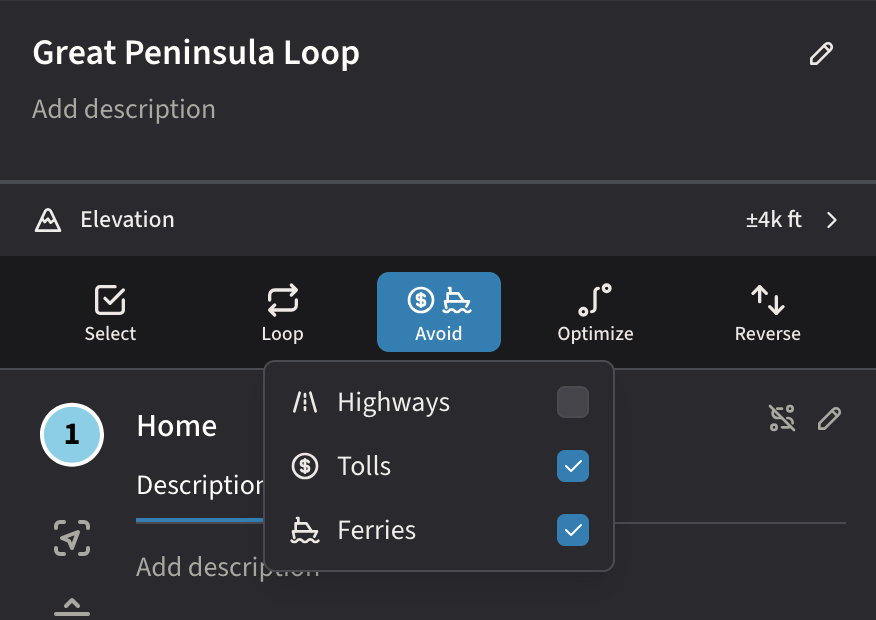
Plot Along 2.4.5 introduces routing preferences for the open road. Tell the planner which roads to skip and your route is recomputed to match.
Avoid Highways
A new Avoid button in the waypoint controls row opens a popover where you can opt out of motorways, toll roads, and ferries. Toggle any combination and the route recalculates around them.
- Skip the interstate. Avoid highways routes you onto smaller roads. Better for scenic drives and motorcycle trips.
- Skip tolls. Avoid toll roads when you’d rather not pay at the booth.
- Skip ferries. Useful when you’re towing or want to stay on land.
- Profile-aware. Highways and tolls apply to driving routes. Ferries applies to every profile.
- Sticks to the map. Your choices save per-map. A new account preference sets defaults for every new route.
Quick Bypass
Bypassing a waypoint no longer requires opening its Settings tab. A new icon button next to the edit pencil excludes a waypoint from the route in one tap. Tap the Bypassed badge to bring the waypoint back.
Polish & Reliability
Waypoints can no longer be accidentally dragged or tapped by a stray second finger on touchscreens.